Grafana Dashboard
📊 Grafana Dashboard
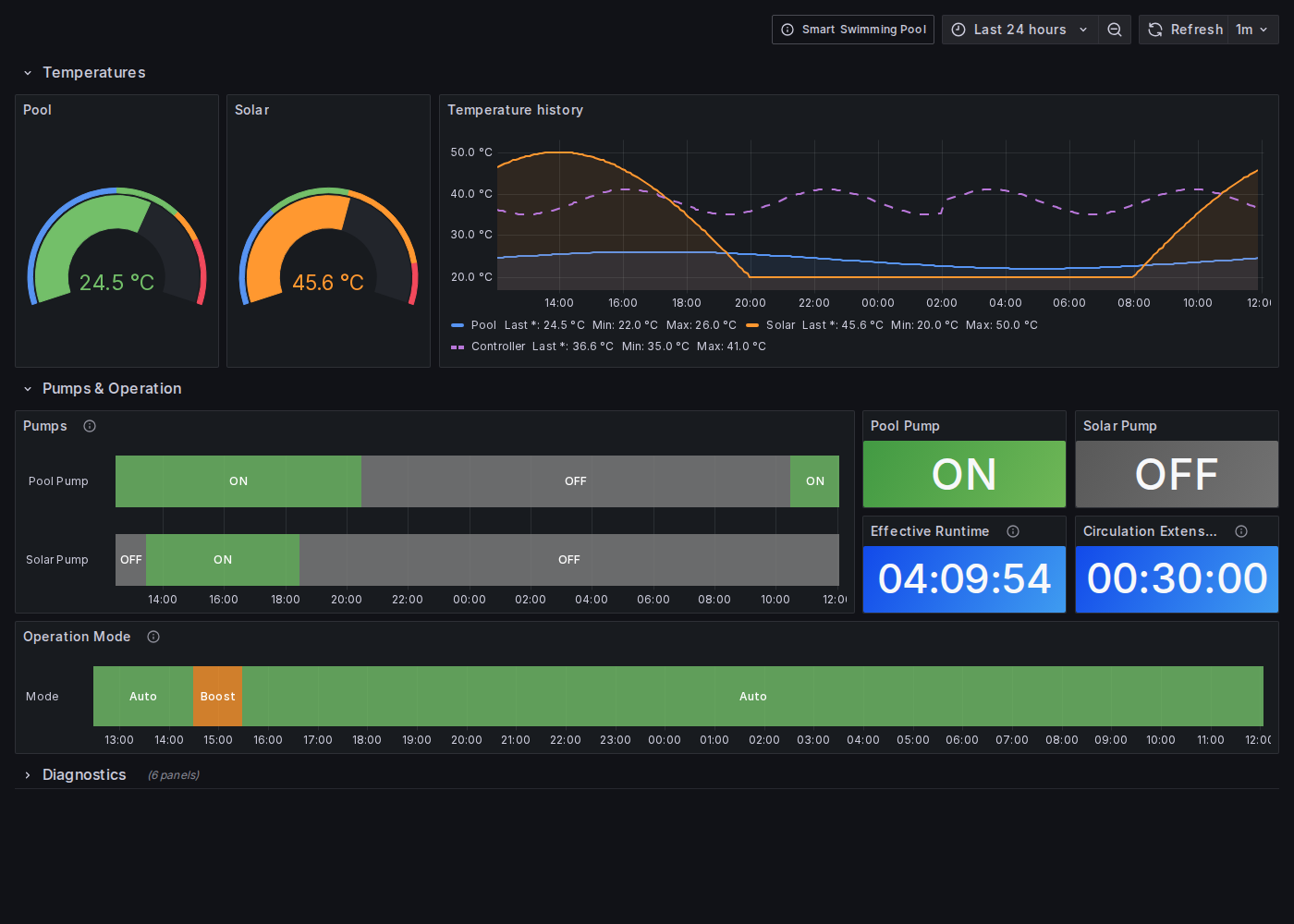
The Grafana Dashboard visualizes your Smart Swimming Pool over time: pool and solar temperatures, pump switching times, the operation mode and controller diagnostics. It is made for the Pool Controller v5.x and reads the data that Home Assistant stores in InfluxDB.
💡 How It Works
Pool Controller ──MQTT discovery──▶ Home Assistant ──InfluxDB integration──▶ InfluxDB ──▶ Grafana- The Pool Controller publishes its entities via Home Assistant MQTT discovery (see Home Assistant Integration).
- The InfluxDB integration of Home Assistant stores the entity states in InfluxDB.
- Grafana queries this database and renders the dashboard.
✨ Dashboard Panels
| Section | Panels |
|---|---|
| Temperatures | Pool and solar gauges, history of pool, solar and controller temperature |
| Pumps & Operation | Pump state timeline, current pump state, effective runtime, circulation extension, operation mode (auto, manual, boost, timer) |
| Diagnostics | WiFi signal, uptime, free heap, controller temperature with history |
🔧 Installation
Prerequisites
- Pool Controller v5.x connected to Home Assistant
- Home Assistant InfluxDB integration with default measurement settings
- InfluxDB 1.x (or 2.x with InfluxQL) and Grafana 10 or newer
Store the pool data in InfluxDB
Example for Home Assistant’s configuration.yaml:
influxdb:
  host: influxdb.local
  database: home_assistant
  include:
    entity_globs:
      - sensor.pool_controller_*
      - switch.pool_controller_*
      - select.pool_controller_*
Import the dashboard
- Add an InfluxDB data source (query language InfluxQL) in Grafana.
- Download
dashboard-smart-swimming-pool.json. - Open Dashboards → New → Import, upload the file and select your InfluxDB data source.
If you renamed the Pool Controller entities in Home Assistant, adjust the dashboard variables under Dashboard settings → Variables.
Note
Using openHAB with Pool Controller v1/v2? The original dashboard is still available as
dashboard-smart-swimming-pool-openhab-legacy.json.
🚀 Next Steps
- Start Here - Choose your path based on your goals
- Visit Repository - Dashboard JSON and documentation
- Pool Controller Setup - Ensure your controller is running
- Home Assistant Integration - Connect the controller to Home Assistant
💬 Need Help?
- Check the Troubleshooting page
- Visit the Grafana Dashboard Repository
- Open an Issue for bugs or feature requests
- Consult the Grafana Documentation for Grafana-specific questions
Last updated on