Hardware Guide
Hardware Guide | Water Quality Monitor
This guide provides comprehensive information for building the Water Quality Monitor hardware, from selecting parts to assembling the complete device.
⚠️ Status: Under Development — This module is in the planning phase. Hardware specifications may change as development progresses.
✨ Overview
The Water Quality Monitor is designed to be a modular, extensible device for monitoring swimming pool water chemistry. The current design focuses on pH and chlorine monitoring, with the ability to add additional sensors in the future.
Design Goals:
- Accuracy: Reliable measurements comparable to commercial test kits
- Reliability: Robust operation in outdoor pool environments
- Extensibility: Easy to add new sensor types
- Affordability: Cost-effective compared to commercial systems
- Integration: Seamless integration with Smart Swimming Pool ecosystem
⚡ Parts List (BOM)
⚡ Core Components
| # | Component | Qty | Approx. Cost | Notes | Recommended Suppliers |
|---|---|---|---|---|---|
| 1 | ESP8266 Development Board | 1 | 5–10€ | WeMos D1 Mini or NodeMCU | Amazon, AliExpress |
| 2 | pH Sensor with BNC Probe | 1 | 20–50€ | 0-14 pH range, BNC connector | 14core, AliExpress |
| 3 | pH Electrode Storage Solution | 1 | 5–10€ | For electrode storage | Amazon |
| 4 | pH Calibration Solutions | 2 | 10–20€ | pH 4.0 and pH 7.0 | Amazon |
⚡ Optional Components
| # | Component | Qty | Approx. Cost | Notes | Recommended Suppliers |
|---|---|---|---|---|---|
| 5 | Chlorine Sensor | 1 | 30–80€ | For chlorine monitoring | Various suppliers |
| 6 | Temperature Sensor | 1 | 5–10€ | DS18B20 waterproof | Amazon |
| 7 | External ADC Module | 1 | 2–5€ | ADS1115 for better precision | AliExpress |
| 8 | OLED Display | 1 | 5–10€ | SSD1306 or SH1106 | AliExpress |
| 9 | I2C Multiplexer | 1 | 2–5€ | For multiple I2C sensors | AliExpress |
⚡ Enclosure & Installation
| # | Component | Qty | Approx. Cost | Notes | Recommended Suppliers |
|---|---|---|---|---|---|
| 10 | Waterproof Enclosure | 1 | 10–20€ | IP65+ rating | Amazon |
| 11 | Cable Glands | 2–4 | 2–5€ | For waterproof cable entry | Reichelt |
| 12 | Sensor Mount | 1 | 5–10€ | For pH/chlorine probe mounting | Amazon |
| 13 | Desiccant Packs | 2 | 2–5€ | Prevent condensation | Amazon |
⚡ Tools Required
| Tool | Purpose | Notes |
|---|---|---|
| Soldering iron | Soldering components | 320–350°C recommended |
| Solder | Electrical connections | Leaded for beginners, lead-free for RoHS |
| Flux | Improve solder flow | Rosin-core recommended |
| Wire cutters/strippers | Cut and strip wires | For hookup wire |
| Multimeter | Test continuity and voltage | Essential for debugging |
| Magnifying glass | Inspect solder joints | For quality control |
| Calibration beakers | Sensor calibration | 50-100ml capacity |
| Distilled water | Rinsing sensors | For calibration and cleaning |
⚡ Total Cost Estimate
| Configuration | Approx. Cost | Notes |
|---|---|---|
| Basic (pH only) | 40–80€ | ESP8266 + pH sensor + enclosure |
| Standard (pH + temp) | 50–100€ | Adds temperature sensor |
| Advanced (pH + chlorine + temp) | 100–200€ | Adds chlorine sensor and ADC |
| Complete (all sensors + display) | 120–250€ | All sensors, display, premium enclosure |
⚡ Sensor Selection Guide
⚡ pH Sensors
We recommend the following pH sensors based on testing and community feedback:
✅ Recommended: 14core pH Sensor with BNC Probe
Specifications:
- Range: 0-14 pH
- Resolution: 0.01 pH
- Accuracy: ±0.1 pH
- Response Time: < 1 minute
- Temperature Range: 0-60°C
- Output: Analog voltage (0-3.3V or 0-5V)
- Connector: BNC
- Probe Type: Glass electrode with reference
Pros:
- Affordable price
- BNC connector for easy replacement
- Good documentation and support
- Compatible with ESP8266 ADC
Cons:
- Requires regular calibration
- Limited lifespan (1-2 years)
- Sensitive to temperature changes
Resources:
⚡ Alternative: Atlas Scientific pH Sensor
Specifications:
- Range: 0-14 pH
- Resolution: 0.001 pH
- Accuracy: ±0.01 pH
- Interface: I2C or UART
- Probe Type: Industrial glass electrode
Pros:
- Very high accuracy
- Digital interface (less noise)
- Robust construction
- Long lifespan
Cons:
- Expensive
- Requires specific circuit design
Resources:
⚡ Alternative: DFRobot pH Sensor
Specifications:
- Range: 0-14 pH
- Resolution: 0.1 pH
- Accuracy: ±0.1 pH
- Output: Analog voltage
- Interface: Gravity 3-pin connector
Pros:
- Good documentation
- Easy to use with Arduino/ESP8266
- Affordable
Cons:
- Lower accuracy than Atlas Scientific
- Requires calibration
Resources:
⚡ Chlorine Sensors
Chlorine sensor selection depends on your requirements and budget:
⚡ Option 1: Electrochemical Chlorine Sensor
Specifications:
- Range: 0-10 ppm (free chlorine)
- Resolution: 0.1 ppm
- Accuracy: ±0.5 ppm
- Response Time: < 2 minutes
- Interface: Analog voltage
- Lifespan: 1-2 years
Pros:
- Direct measurement
- Real-time monitoring
- Good accuracy
Cons:
- Requires regular calibration
- Limited lifespan
- Sensitive to temperature and pH
Note: Many electrochemical chlorine sensors require specific calibration procedures and may have cross-sensitivity to other chemicals.
⚡ Option 2: Optical Chlorine Sensor
Specifications:
- Range: 0-10 ppm
- Resolution: 0.1 ppm
- Accuracy: ±0.2 ppm
- Interface: I2C or UART
- Lifespan: 2-5 years
Pros:
- No calibration needed (factory calibrated)
- Long lifespan
- Less sensitive to interference
Cons:
- Expensive
- Complex optical design
- May require specific light sources
⚡ Option 3: DPD Colorimetric Method
Specifications:
- Range: 0-10 ppm
- Resolution: 0.1 ppm
- Accuracy: ±0.2 ppm
- Interface: Analog (color intensity)
- Method: Chemical reaction with DPD reagent
Pros:
- Standard method used in test kits
- Good accuracy
- Well understood chemistry
Cons:
- Requires reagent tablets or powder
- Manual process (unless automated)
- Reagents have limited shelf life
Note: DPD method can be automated with a peristaltic pump and colorimeter, but this adds significant complexity.
⚡ Temperature Sensor (Optional)
Recommended: DS18B20 Waterproof Temperature Sensor
Specifications:
- Range: -55°C to +125°C
- Accuracy: ±0.5°C
- Resolution: 9-12 bits (configurable)
- Interface: OneWire
- Waterproof: Yes (stainless steel probe)
- Cable Length: 1m (standard)
Pros:
- Affordable
- Waterproof
- Easy to use with ESP8266
- No calibration needed
Cons:
- Requires pull-up resistor
- Limited to 12 sensors per OneWire bus
Resources:
⚡ Circuit Design
⚡ Basic Circuit (pH Only)
This is the simplest configuration for pH monitoring only.
ESP8266 Development Board (WeMos D1 Mini)

   3.3V [ pH Sensor VCC ]
   GND [ pH Sensor GND ]
   A0  [ pH Sensor Output ]

   pH Sensor Board (14core)

   BNC Connector [ pH Electrode Probe ]
Wiring Details:
| ESP8266 Pin | WeMos D1 Pin | pH Sensor Pin | Notes |
|---|---|---|---|
| 3.3V | 3V3 | VCC | Power (3.3V) |
| GND | G | GND | Ground |
| A0 | A0 | Output | Analog output |
Important Notes:
- Use 3.3V power, not 5V (most pH sensors are 3.3V compatible)
- Keep wire lengths as short as possible to minimize noise
- Use shielded cable for the analog signal if possible
- Avoid running sensor cables parallel to power cables
⚡ Advanced Circuit (pH + Temperature)
This configuration adds temperature monitoring for pH compensation.
ESP8266 Development Board (WeMos D1 Mini)

   3.3V [ pH Sensor VCC ]
   3.3V [ DS18B20 VCC ] (via 4.7kΩ pull-up)
   GND [ pH Sensor GND ]
   GND [ DS18B20 GND ]
   A0  [ pH Sensor Output ]
   D2  [ DS18B20 DATA ] (OneWire)

   pH Sensor Board

   BNC Connector [ pH Electrode Probe ]

   DS18B20 Waterproof Sensor
Wiring Details:
| ESP8266 Pin | WeMos D1 Pin | Component | Notes |
|---|---|---|---|
| 3.3V | 3V3 | pH Sensor VCC | Power |
| 3.3V | 3V3 | DS18B20 VCC | Power (via pull-up) |
| GND | G | pH Sensor GND | Ground |
| GND | G | DS18B20 GND | Ground |
| A0 | A0 | pH Sensor Output | Analog input |
| D4 | D2 | DS18B20 DATA | OneWire data (with 4.7kΩ pull-up to 3.3V) |
DS18B20 Pull-up Resistor:
- Value: 4.7kΩ
- Connection: Between DS18B20 DATA line and 3.3V
- Important: Required for OneWire communication
⚡ Complete Circuit (pH + Chlorine + Temperature + ADC)
This configuration adds chlorine monitoring and uses an external ADC for better precision.
ESP8266 Development Board (WeMos D1 Mini)

   3.3V [ pH Sensor VCC ]
   3.3V [ Chlorine Sensor VCC ]
   3.3V [ ADS1115 VCC ]
   3.3V [ DS18B20 VCC ] (via 4.7kΩ pull-up)
   GND [ pH Sensor GND ]
   GND [ Chlorine Sensor GND ]
   GND [ ADS1115 GND ]
   GND [ DS18B20 GND ]

   SDA (D2) [ ADS1115 SDA ]
   SCL (D1) [ ADS1115 SCL ]

   ADS1115 Channel 0 [ pH Sensor Output ]
   ADS1115 Channel 1 [ Chlorine Sensor Output ]

   D4 [ DS18B20 DATA ] (OneWire)

   pH Sensor Board
   BNC Connector [ pH Electrode Probe ]

   Chlorine Sensor

   DS18B20 Waterproof Sensor
Wiring Details:
| ESP8266 Pin | WeMos D1 Pin | Component | Notes |
|---|---|---|---|
| 3.3V | 3V3 | All sensors VCC | Power |
| GND | G | All sensors GND | Ground |
| D2 | D2 | ADS1115 SDA | I2C Data |
| D1 | D1 | ADS1115 SCL | I2C Clock |
| D4 | D2 | DS18B20 DATA | OneWire data (with pull-up) |
ADS1115 Connections:
- A0 → pH Sensor Output
- A1 → Chlorine Sensor Output
- A2, A3 → Available for future sensors
Benefits of External ADC:
- 16-bit resolution (vs 10-bit on ESP8266)
- Programmable gain (1x, 2x, 4x, 8x, 16x)
- Differential inputs for better noise rejection
- Multiple channels for multiple sensors
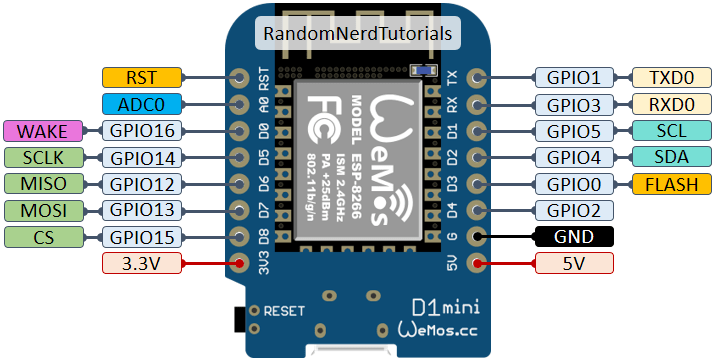
⚡ Pin Assignment (WeMos D1 Mini)
| Function | ESP8266 Pin | WeMos D1 Pin | Notes |
|---|---|---|---|
| pH Sensor VCC | 3.3V | 3V3 | Power |
| pH Sensor GND | GND | G | Ground |
| pH Sensor Output | A0 | A0 | Analog input |
| Chlorine Sensor VCC | 3.3V | 3V3 | Power |
| Chlorine Sensor GND | GND | G | Ground |
| Chlorine Sensor Output | A0 | A0 | Analog (or use ADC) |
| DS18B20 VCC | 3.3V | 3V3 | Power (via pull-up) |
| DS18B20 GND | GND | G | Ground |
| DS18B20 DATA | GPIO2 | D4 | OneWire data |
| I2C SDA | GPIO4 | D2 | For ADC and I2C sensors |
| I2C SCL | GPIO5 | D1 | For ADC and I2C sensors |
| OLED SDA | GPIO4 | D2 | Shared with I2C |
| OLED SCL | GPIO5 | D1 | Shared with I2C |
Note: I2C is a shared bus, so multiple I2C devices (ADS1115, OLED, Atlas Scientific sensors) can share the same SDA/SCL pins.
⚡ Pinout Diagrams
WeMos D1 Mini:
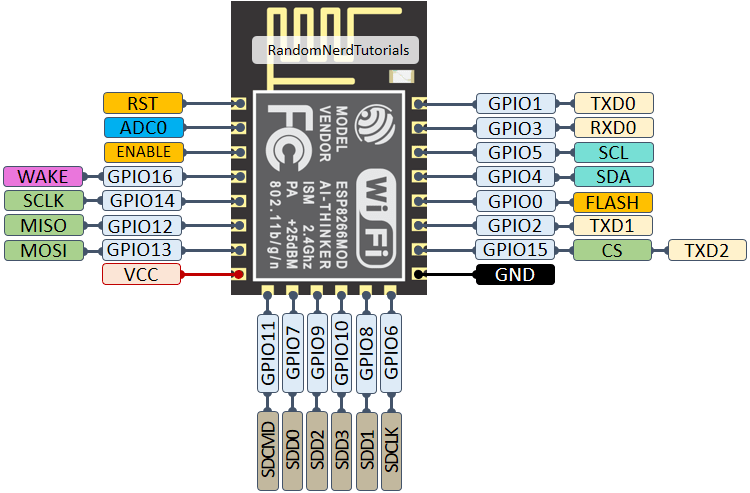
ESP-12E/12F:
⚡ Assembly Instructions
⚡ Step 1: Prepare Components
- Gather all parts from the BOM
- Inspect sensors for damage
- Test pH electrode (if new, it may be dry; soak in storage solution for 24 hours)
- Prepare tools and workspace
⚡ Step 2: Breadboard Prototyping (Recommended)
Best for: Testing before permanent installation, learning the circuit.
Place ESP8266 on breadboard
- Straddle the center gap
- Ensure all pins are properly inserted
Connect pH sensor
- Connect VCC to 3.3V rail
- Connect GND to GND rail
- Connect Output to A0
Add DS18B20 (optional)
- Connect VCC to 3.3V rail (via 4.7kΩ pull-up resistor)
- Connect GND to GND rail
- Connect DATA to D4 (WeMos D1 Mini)
Add ADS1115 (optional)
- Connect VCC to 3.3V rail
- Connect GND to GND rail
- Connect SDA to D2
- Connect SCL to D1
- Connect pH sensor to A0
- Connect chlorine sensor to A1
Verify connections
- Use multimeter to check continuity
- Ensure no short circuits
- Verify all connections are secure
⚡ Step 3: Test Sensors
Test pH sensor:
- Upload test firmware
- Calibrate with pH 7.0 solution
- Test with pH 4.0 and pH 7.0 solutions
- Verify readings are stable and accurate
Test DS18B20 (if installed):
- Upload test firmware
- Place sensor in water
- Verify temperature readings
Test ADS1115 (if installed):
- Upload test firmware
- Verify analog readings from both channels
⚡ Step 4: Permanent Assembly
Best for: Final installation, outdoor use, long-term operation.
Option A: Perfboard
- Plan component layout on perfboard
- Solder ESP8266 with pin headers for easy removal
- Solder sensor modules with sufficient spacing
- Add screw terminals for:
- Power input (3.3V/GND)
- Sensor connections
- Solder resistors directly between pins
- Add test points for debugging
Option B: Custom PCB
For production or multiple units, consider designing a custom PCB:
- Design schematic using KiCad or Eagle
- Create PCB layout
- Order PCB from manufacturer (JLCPCB, PCBWay, etc.)
- Solder components to PCB
- Test thoroughly
⚡ Step 5: Enclosure Assembly
Prepare enclosure:
- Drill holes for:
- Sensor cables (use cable glands)
- Power input
- Optional: Display window
- Add mounting points for PCB/perfboard
- Drill holes for:
Install electronics:
- Mount PCB/perfboard in enclosure
- Connect sensor cables
- Add desiccant packs
Install sensors:
- Mount pH electrode in sensor holder
- Position chlorine sensor (if applicable)
- Route cables through cable glands
Seal enclosure:
- Ensure all cable glands are tight
- Check for waterproof integrity
- Test with water spray (if possible)
⚡ Sensor Installation
⚡ pH Sensor Installation
Location:
- Place sensor in pool water, away from returns and skimmers
- Depth: 30-50 cm below surface
- Avoid placing near pump intakes or heaters
- Ensure good water circulation around sensor
Mounting Options:
Floating Mount:
- Sensor floats on surface
- Easy to install and remove
- May be affected by surface debris
Wall Mount:
- Sensor mounted to pool wall
- Stable position
- Requires drilling
Weighted Base:
- Sensor rests on pool floor
- Stable position
- May collect debris
Cable Routing:
- Use waterproof cable for external installations
- Keep cable runs as short as possible
- Use cable ties for strain relief
- Avoid sharp bends or pinching cables
- Route cables away from pool edges to prevent damage
⚡ Chlorine Sensor Installation (if applicable)
Location: Similar to pH sensor
Considerations:
- May need separate enclosure if using DPD method
- Protect from direct sunlight
- Ensure good water flow around sensor
- Avoid chemical feed points (can cause false readings)
⚡ Temperature Sensor Installation (if applicable)
Location:
- Same location as pH sensor (for temperature compensation)
- Or in return line for average pool temperature
Mounting:
- Use sensor holder or weighted base
- Ensure sensor is fully submerged
- Protect from direct sunlight
⚡ Power Supply
⚡ Power Requirements
| Component | Voltage | Current | Notes |
|---|---|---|---|
| ESP8266 | 3.3V | ~80mA (active) | ~20mA (sleep) |
| pH Sensor | 3.3V | ~10mA | |
| Chlorine Sensor | 3.3V | ~10mA | Varies by sensor |
| DS18B20 | 3.3V | ~1mA | |
| ADS1115 | 3.3V | ~1mA | |
| OLED Display | 3.3V | ~20mA | |
| Total (Active) | 3.3V | ~120mA | |
| Total (Sleep) | 3.3V | ~30mA | Without display |
⚡ Power Options
| Option | Pros | Cons | Recommended |
|---|---|---|---|
| USB Power | Simple, widely available | Requires outlet nearby | ✅ For indoor/testing |
| USB Power Bank | Portable, no wiring | Limited runtime | ✅ For temporary setup |
| 5V Power Supply | Stable, continuous | Requires wiring | ✅ For permanent install |
| Solar Power | Autonomous, no wiring | Complex, weather dependent | ⚡ For advanced users |
| Battery + Solar | Best of both worlds | Most complex | ⚡ For remote locations |
⚡ Solar Power Option
For autonomous operation, consider solar power:
Components:
- Solar Panel: 5V/2W (for continuous operation)
- LiPo Battery: 3.7V/2000mAh (for night operation)
- Charge Controller: TP4056 module
- Boost Converter: MT3608 (3.7V to 5V)
Circuit:
Solar Panel (5V) [ TP4056 Charge Controller ]
                                  |
LiPo Battery (3.7V) [ MT3608 Boost Converter ]
                                  |
ESP8266 (5V input) [ AMS1117 3.3V Regulator ]
                                  |
All Sensors (3.3V)
Considerations:
- Panel size: 2W panel provides ~400mA in full sun
- Battery capacity: 2000mAh lasts ~16 hours at 120mA
- Deep sleep: Use deep sleep to extend battery life
- Enclosure: Ensure panel and battery are protected
⚡ Maintenance
⚡ Regular Maintenance Schedule
| Task | Frequency | Notes |
|---|---|---|
| Clean pH electrode | Weekly | Rinse with storage solution |
| Calibrate pH sensor | Monthly | Use pH 4.0 and 7.0 solutions |
| Check chlorine sensor | Monthly | Verify readings with test strips |
| Inspect enclosure | Monthly | Check for water ingress, condensation |
| Test MQTT connection | Monthly | Verify data is being published |
| Replace pH electrode | Annually | Or when readings become unreliable |
| Replace calibration solutions | Every 3-6 months | Or when contaminated |
| Check power supply | Quarterly | Verify stable voltage |
| Inspect cables | Quarterly | Check for damage or wear |
⚡ pH Sensor Maintenance
Cleaning:
- Remove sensor from pool
- Rinse with distilled water
- Gently clean electrode with soft cloth
- Soak in storage solution for 1 hour
- Recalibrate if necessary
Storage:
- Short-term (< 1 week): Store in pH 7.0 buffer solution
- Long-term (> 1 week): Store in storage solution
- Never store dry (will damage electrode)
Troubleshooting:
- Readings unstable: Clean electrode, check for air bubbles
- Readings inaccurate: Recalibrate, check for contamination
- Readings drift: Replace electrode (typically lasts 1-2 years)
- No response: Check connections, verify power
⚡ Chlorine Sensor Maintenance
Maintenance depends on sensor type:
Electrochemical:
- Calibrate monthly or as needed
- Replace annually or when readings become unreliable
- Store dry when not in use
Optical:
- Clean optical window monthly
- Verify calibration quarterly
- Replace every 2-5 years
DPD Colorimetric:
- Replace reagent tablets as needed
- Clean colorimeter window monthly
- Calibrate with known standards
⚡ Troubleshooting
⚡ Common Issues
| Issue | Possible Cause | Solution |
|---|---|---|
| pH readings unstable | Dirty electrode | Clean electrode with storage solution |
| pH readings inaccurate | Needs calibration | Recalibrate with pH 4.0 and 7.0 |
| pH readings drift | Old electrode | Replace electrode |
| No MQTT messages | WiFi connection issue | Check WiFi credentials and signal |
| MQTT connected but no data | Sensor wiring issue | Check sensor connections |
| Sensor not responding | Power issue | Check power supply to sensor |
| Condensation in enclosure | Poor ventilation | Add ventilation or desiccant |
| ESP8266 not starting | Power issue | Check USB cable, power supply |
| Analog readings noisy | Long wires, no shielding | Use shielded cable, shorten wires |
⚡ Debugging Steps
Check power:
- Verify 3.3V at ESP8266
- Verify 3.3V at sensors
- Check for short circuits
Check connections:
- Verify all wires are properly connected
- Check for cold solder joints
- Use multimeter to test continuity
Test sensors individually:
- Test pH sensor with known solutions
- Test DS18B20 with known temperatures
- Test ADS1115 with simple voltage input
Check serial output:
- Upload debug firmware
- Monitor serial output for error messages
- Verify sensor readings in serial monitor
Test MQTT:
- Verify WiFi connection
- Test MQTT with simple client
- Check broker logs
⚡ Safety Considerations
⚠️ Electrical Safety
- Use low voltage (3.3V/5V) for all electronics
- Keep electronics dry — Use waterproof enclosures
- Use waterproof connectors for all outdoor connections
- Ground all metal parts if possible
- Use RCD/FI protection for any mains-powered components
- Avoid working on circuit when connected to power
⚠️ Chemical Safety
- Handle calibration solutions with care — Some may be corrosive
- Wear gloves when handling sensors and solutions
- Avoid skin contact with calibration solutions
- Rinse with water if solution contacts skin
- Dispose of old solutions properly — Follow local regulations
- Store chemicals properly — In original containers, labeled
⚠️ Pool Safety
- Do not rely solely on this monitor for pool safety
- Regularly test water manually with test strips or kits
- Follow local health department guidelines for pool water quality
- Keep pool chemicals properly stored and labeled
- Never mix chemicals — Can cause dangerous reactions
- Ensure proper ventilation when handling chemicals
⚡ Additional Resources
⚡ Datasheets
⚡ Pinout References
⚡ External Resources
Happy building! ✅\n \n Made with ❤️ by the Smart Swimming Pool community